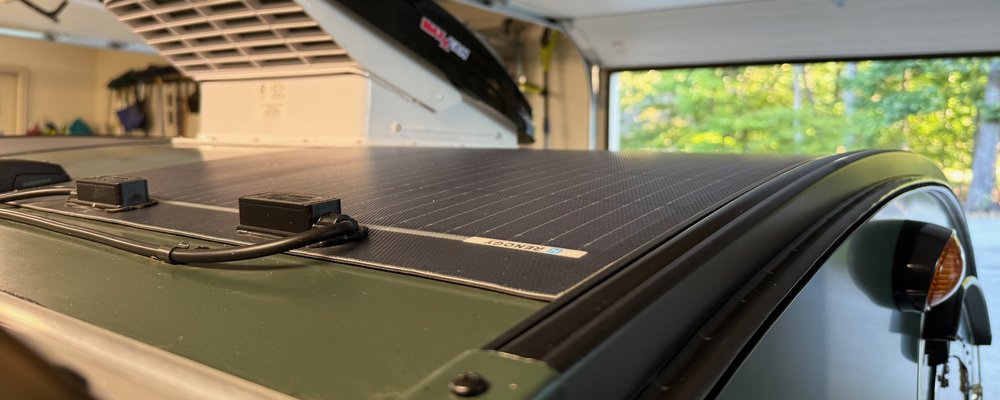
Reading the Battery Monitor.
The Victron BMV-712 on my galley control panel shows about a dozen numbers, and most of them are informational. Voltage is the one everybody looks at first, and on a lithium battery it tells you almost nothing. State of charge is the one everybody trusts, and it drifts. Time-to-go changes its mind every time the fridge compressor kicks on. Here's what each screen measures, which one to believe, and the settings that get it telling the truth about a LiFePO4 battery like my Renogy Core Mini 300Ah. The sizing math is in the amp-hours post, and this one is about reading the thing once it's on the wall.
Voltage Is Not State of Charge
A lead-acid battery's voltage falls steadily as it empties, so a voltmeter works as a rough fuel gauge. Lithium iron phosphate doesn't do that. A 12V LiFePO4 battery rests at roughly 13.2 to 13.3 volts from somewhere around 90% all the way down to somewhere around 20%, so across most of its usable range the voltage barely moves. A battery reading 13.3 V could be nearly full or two nights from empty, and the number won't tell you which.
Voltage is only useful at the ends. Above about 13.6 V under charge, the battery is close to the top. Below about 12.8 V at rest, it's close to the bottom and about to fall off a cliff. In between, the voltage readout on the solar controller is mostly decoration, and that's why the shunt exists.
The Shunt, and Why Every Load Passes Through It
The shunt is a precision resistor in the battery's negative lead. The BMV measures the tiny voltage drop across it, turns that into amps going in and out, and adds them up over time. It's called coulomb counting, and it only works if every bit of current that leaves the battery goes through the shunt.
So the battery negative connects to the shunt's battery side and nothing else. The shunt's load side goes to the negative bus bar, and everything on the trailer grounds to that bar. An inverter negative run straight to the battery post, a chassis ground strap off the battery terminal, or a solar controller negative landed on the post is current the monitor never sees. The giveaway is a consumed Ah number that doesn't move when you turn a big load on. The electrical system post shows where mine sits.
What Each Screen Is Telling You
Voltage
Useful at the top and the bottom on lithium and not much in the middle. Watch it under load for a sag that points to a loose connection.
Current
Amps right now, with a sign, and negative means it's leaving the battery. The fridge compressor shows up here as a step of a few amps that comes and goes.
Power
The same thing in watts. Handy for comparing loads, and for catching an inverter idling away with nothing plugged into it.
Consumed Ah
How many amp-hours have come out since the last full charge. This is the number to trust, since it's a direct measurement and not a calculation stacked on top of one.
State of Charge
Consumed Ah against the capacity you typed in, as a percentage. It picks up every error in the count and every error in the capacity setting.
Time-to-Go
Amp-hours left divided by the average current over the last few minutes. It changes with every compressor cycle, so it's a trend and not a promise.
For a sense of scale, my fridge is a Dometic CFX3 35 on its own 14 AWG circuit, and it averages about 1.6 to 1.8 Ah an hour, which works out to 38 to 43 Ah a day. Knowing that number for your own fridge makes consumed Ah a lot easier to read.
The 712 also has a second input for a starter battery, a midpoint, or a temperature sensor. My temperature sensor is wired in between the battery and the shunt, but the aux input is still set to none, so the BMV ignores it. Enabled, it adjusts capacity for cold.
Why State of Charge Drifts
Counting coulombs piles up error. The shunt is accurate but not perfect, charging isn't 100% efficient, currents below the monitor's threshold get ignored, and the BMV itself draws a trickle. Over a week off-grid that adds up to a few points off, then more.
The monitor fixes this by resetting itself to 100% when it sees a full charge. It decides the battery is full when the voltage sits above the charged voltage setting and the current has dropped below the tail current setting for the charged detection time, all three at once. That's the sync, and it's the only thing that pulls the count back to reality.
Here's the catch for a trailer parked under the trees in the Smokies. My two Renogy 100W panels feed a Victron SmartSolar 75/15, and if the solar never pushes the battery up into absorption, the sync never fires. Spend a week at Elkmont in October and the SOC figure turns into a guess wearing a percent sign. The fix is a real full charge, either on shore power in the driveway before the trip or a sunny day with the panels clear. If you know it's full and the monitor doesn't, the app has a manual sync.
Why Time-to-Go Lies
Time-to-go is simple division: the amp-hours left above your discharge floor, divided by the average current over a short window. The window is the problem. A compressor fridge runs a few amps for a few minutes and then nothing for a while, the Propex fan cycles, and somebody plugs in a laptop. The estimate swings with it, from three days to eleven hours and back in fifteen minutes.
Read it at bedtime, when the loads have settled down, and treat it as a direction. If it's shorter tonight than last night with the same stuff running, something changed, and that's what it's good for. Just don't plan your morning coffee around it.
Setting It Up for LiFePO4
The BMV ships with lead-acid defaults, and they're wrong for lithium. Here's what I run.
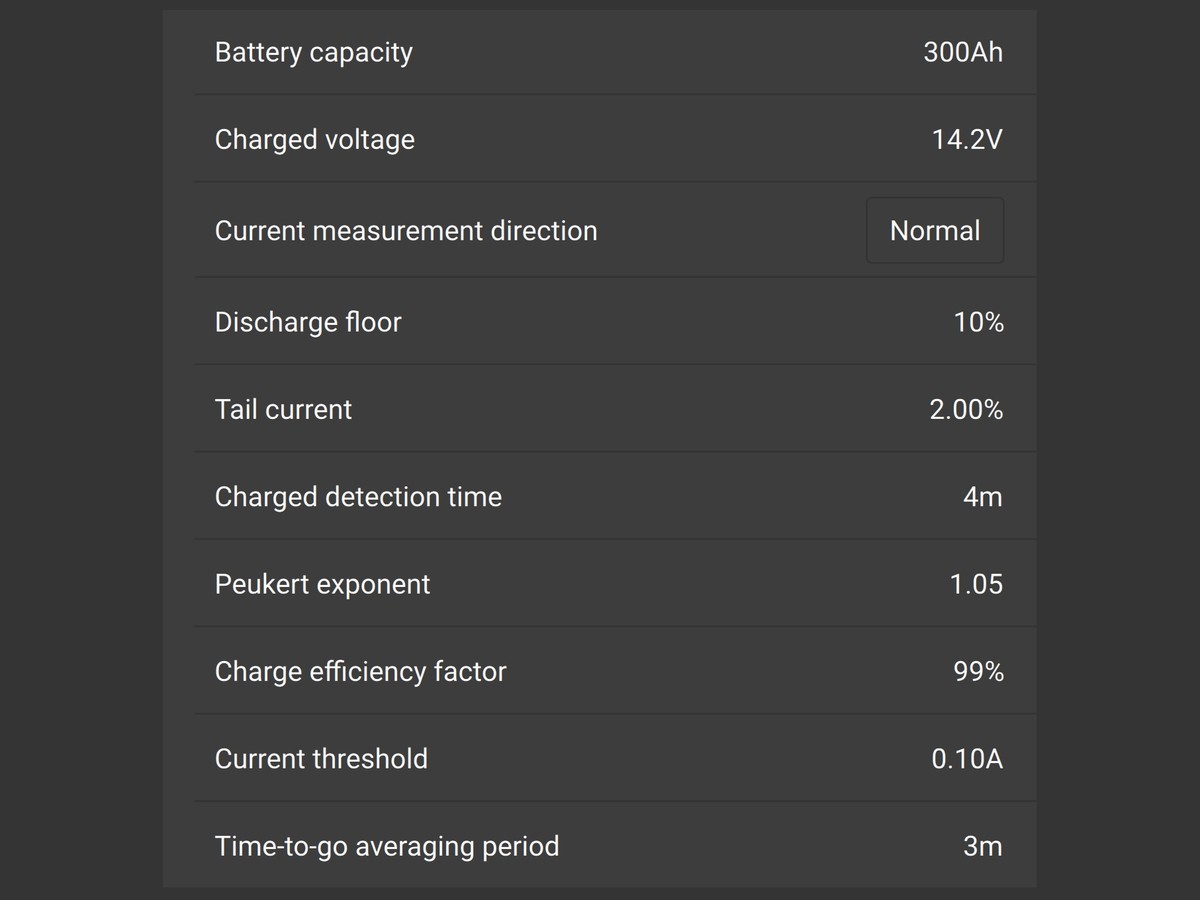
Charged voltage is the one that causes trouble. It has to match whatever charger will actually fill the battery, which for me is the SmartSolar on a sunny day and the MultiPlus on shore power. If those two are set to different absorption voltages, pick the lower one and set the BMV just under it.
The Winter Check
The usual advice is that lithium stores best partly charged, around half. Mine stays connected in its aluminum box under the bed all winter. I switch off everything that draws power with the main kill switch, but I leave the solar PV breaker on so the panels keep the battery topped off whenever the trailer isn't covered or in the garage. Once a month I'd read the voltage and consumed Ah and compare them with last month. The BMV draws a trickle even with everything switched off, and on a 300Ah battery that's months of margin, but the reading is what proves it.
Leaving the solar on only works because of the battery. LiFePO4 shouldn't be charged below freezing, and an unheated trailer in Knoxville in January sees plenty of mornings under 32°F. The Renogy Core Mini's BMS has a temperature cutoff (it stops taking a charge below 32°F and stops discharging below -4°F, with no built-in heater), so the solar controller can't push a charge into it on a cold morning. And if you pull the battery or disconnect it for storage, the BMV loses its count, so the first thing to do in spring is a full charge so it can sync.
The History Screen
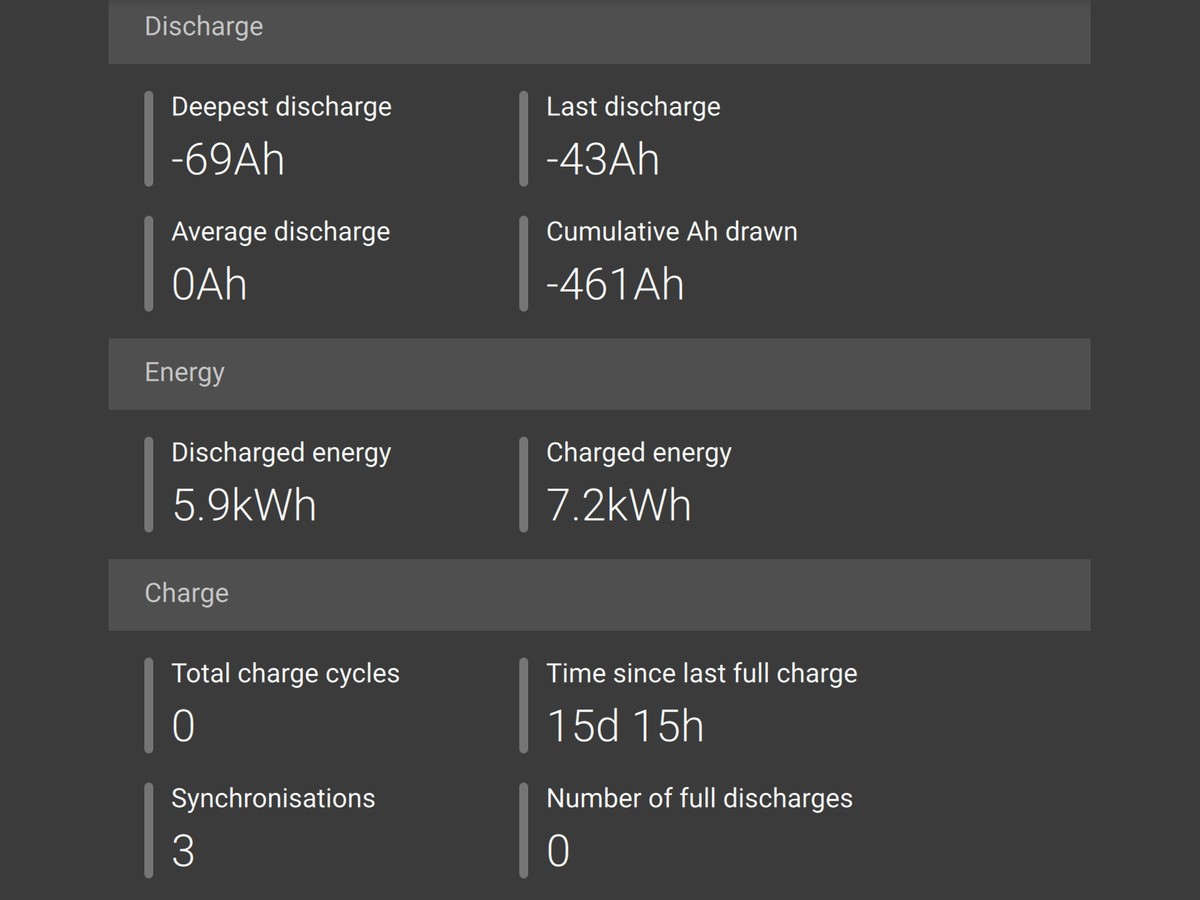
Over Bluetooth, VictronConnect keeps a history the panel doesn't show, from deepest discharge and charge cycles to synchronizations and time since last full charge. Two of those are worth a look after every trip.
Deepest discharge tells you whether the battery is the right size. If it never gets past 40% consumed, the battery is bigger than your trips, and if it's brushing the floor, the next trip is going to be the one where the fridge quits. Time since last full charge tells you how much to believe the SOC figure, and if it says nine days, the percentage is more of a story than a number.
On the Panel
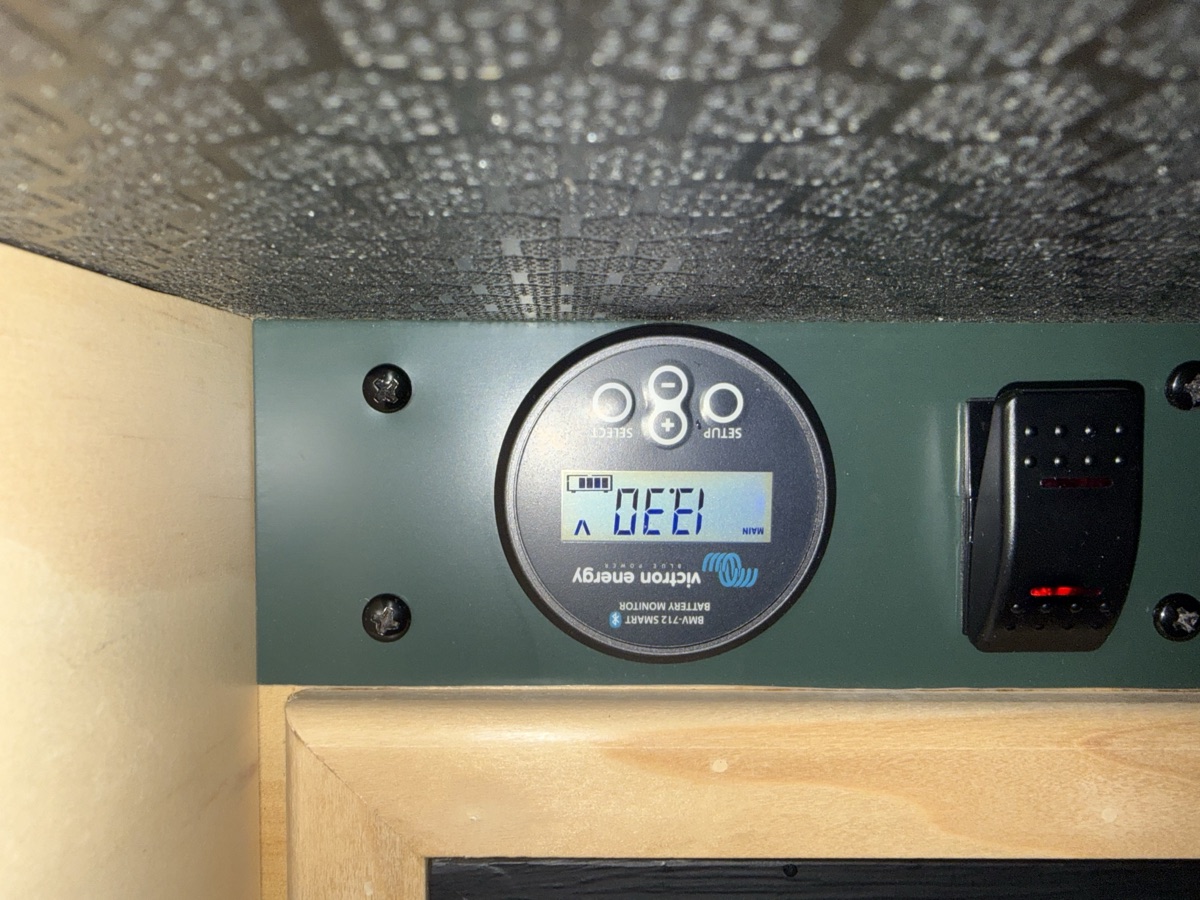

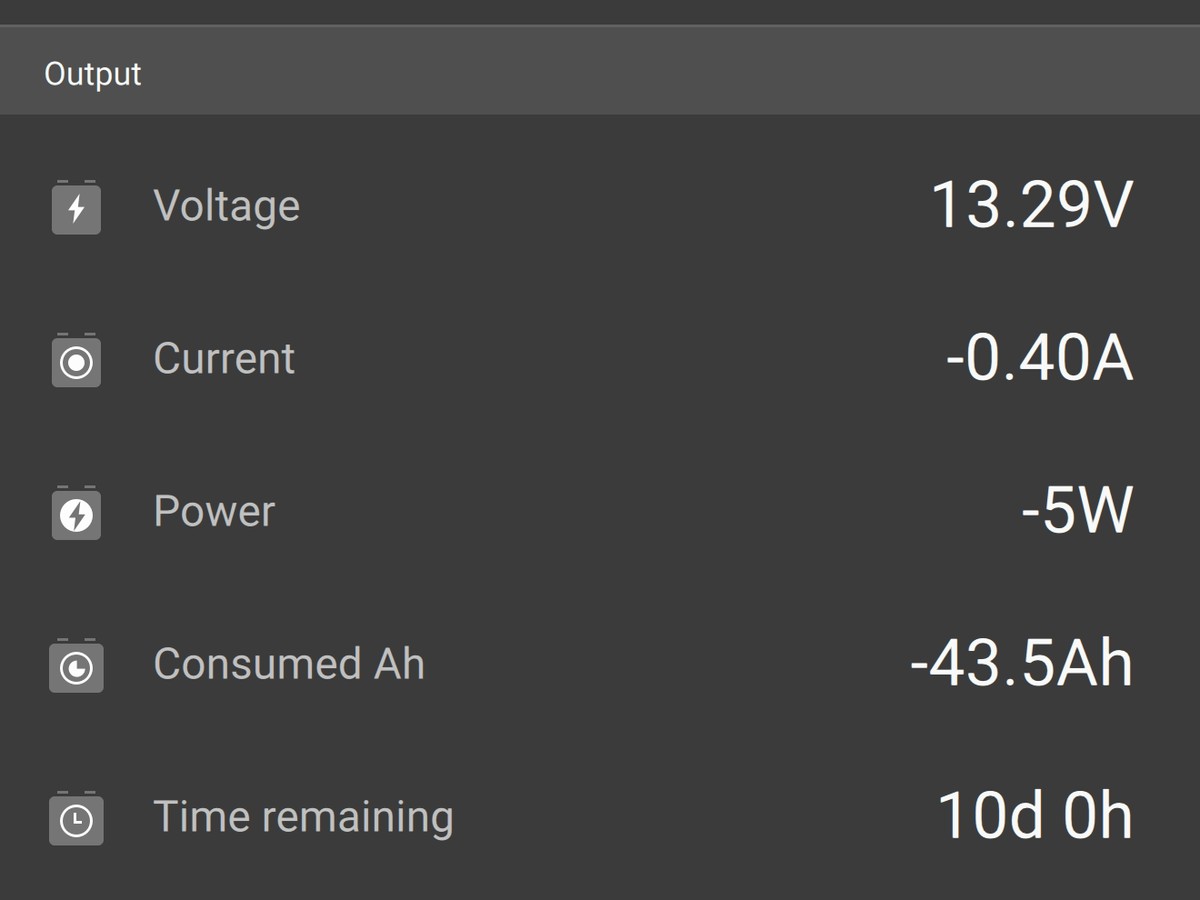
Every Trip
Put the Shunt in the Right Place.
My free wiring diagram builder puts the shunt on the negative side with every load downstream of it, so the monitor counts everything from day one.
Open the Wiring Diagram BuilderShop This Post
Disclosure: KnoxDrops is a participant in the Amazon Services LLC Associates Program. As an Amazon Associate we earn from qualifying purchases — if you buy through a link on this page, it costs you nothing extra.
← Back to Blog